List tuto and free hover
Bismillah.Assalamualaikum.Dirah kembali.Tadi dirah bgi freebies doodle handmade punye kan ? Sekang nk ajo korang cara buat tuto and freebies list hover cam dirah..K,sebelum buat mesti paham dulu,dah paham?Cer hover benda kat bawah nie :
The Blog
Main House
Dah faham?Nak try?Yg nie sesuai untuk blogskin aja ye ;)Maaf kepada pemilik tuto ini.Dirah x ingat sape punye tuto.Nie dirah type ndiri.Maaf sangat.Tak berniat nk buang kredit.Thx pade siape yg bgi tuto nie :)
1.Blogger-->Template-->Search perkataan </style> menggunakan f3 or ctrl + f serentak !
2.Dah? Letak kode nie kat bawah kod </style> :
<style>
.list {
background:url( URL ICON );
background-repeat:no-repeat;
background-size:10px;
padding-left:25px;
color:#999;
display:block;}
@font-face{
font-family:'Short Stack';
}
.list:hover {
-webkit-transition:All 0.4s ease;
-moz-transition:All 0.4s ease;
-o-transition:All 0.4s ease;
text-shadow: -6px 0 000, 0 6px 000,
6px 0 000, 0 -6px 000;
background:url(URL ICON);
background-repeat:no-repeat;
background-size:15px;
}
</style>
<a class="list" href="Link">Tajuk</a><br /></div>
<a class="list" href="Link">Tajuk</a><br /></div>
Kuning = Bentuk icon
Biru = Font
Merah = Link
Oren = Tajuk
Labels: hover, request, tuto
Cara buat footer
Annyeong.Welcome.Haha.New skin hah?Yes.Pakai skin ndiri.
Cam cantik jer cam comel jer. K nie adelah tuto about cara buat footer.Direquest oleh
Miraa .
Saye buat nie just for Template Designer/Blogskin.K,ikut step ya,sayang.Maaf kpd pmilik tuto.Dirah lpe spe punye tuto.Tapi nie dirah type gune jari jemari dirah.Tak search kat nternet pon.Maaf kalo korg rse nie korang pnye tuto.
1.Blogger -->Sign in --> Template
2.Tekan f3 of ctrl + f serentak! Search kod </body>
3.Dapat ? Copy kod bawah </body>
<center><img src="URL IMAGE FOOTER"/></center>
Merah : Url Image Footer korang.
Kalo tak tau nak dapat footer tuh kat mane,blh request,sayang
Labels: request, tuto
Border Cbox
Annyeong.Dirah kembali dengan tutorial ttg *tajuk*.Boleh re-post cume bagitau dirah.Tuto ini direquest oleh
Sis Iqa.
Macam mne dirah pnye border cbox smpai ade org request n tnye nie?Macam niw lh dirah pnye border cbox
Cm tu lh brder nye :).K,ne nnye snng sgt !Tpi ini ONLY FOR CBOX THAT USED ON THIS WEBSITE >>
THIS WEBSITE<< . Kalau tak tau nak register cbox nie meh gi
>>SINI<<
Dah tau ? Dah ade ? Ikut je step bawah nie :
1.Cari kod cbox korang
2.Kan ade die tulis " border:Kod warna border cbox korang 1px solid " , tukar yang 1px solid (border:Kod warna border cbox korang 1px solid)
Labels: cbox, own made, request
Tukar credits
annyeong.Hari nie dirah nk buat tuto.Tapi plz
Boleh Re-Post,Bagitau.Tuto nie direquest oleh
Miraa.Di facebook lah
She's newbie.K,dont waste time.Tgk nie :
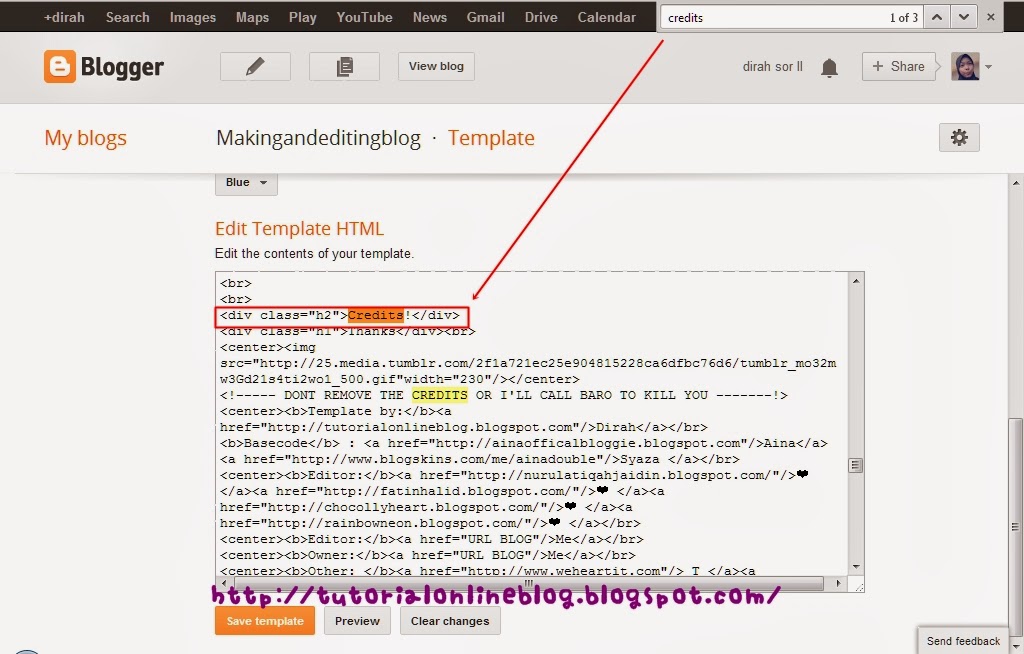
1)Tekan f3 atau ctrl + f . Cari perkataan Credit / Credits / Help / Thanks / Thank / Clap.
2)Tukar Your URL link dan Your Name.Your URL link tuh tukar jadi link blog korang.Your Name tuh tukar dgn nama korang.Tips : jangan letak nama pepanjang :)
3)Dah tukar ? Jadi cam nie :
4)Siap?Kalau korang nie seorang yg teliti tkn Preview dulu.Takut tiba-tiba rosak !
5)Dah preview?Dah okey?Tkan SAVE !
JANGAN TUKAR BENDA LAIN KECUALI YOUR LINK BLOG DAN NAME
Labels: credit, for newbie, request, template
 List tuto and free hover

Bismillah.Assalamualaikum.Dirah kembali.Tadi dirah bgi freebies doodle handmade punye kan ? Sekang nk ajo korang cara buat tuto and freebies list hover cam dirah..K,sebelum buat mesti paham dulu,dah paham?Cer hover benda kat bawah nie :
The Blog
Main House
Dah faham?Nak try?Yg nie sesuai untuk blogskin aja ye ;)Maaf kepada pemilik tuto ini.Dirah x ingat sape punye tuto.Nie dirah type ndiri.Maaf sangat.Tak berniat nk buang kredit.Thx pade siape yg bgi tuto nie :)
1.Blogger-->Template-->Search perkataan </style> menggunakan f3 or ctrl + f serentak !
2.Dah? Letak kode nie kat bawah kod </style> :
<style>
.list {
background:url( URL ICON );
background-repeat:no-repeat;
background-size:10px;
padding-left:25px;
color:#999;
display:block;}
@font-face{
font-family:'Short Stack';
}
.list:hover {
-webkit-transition:All 0.4s ease;
-moz-transition:All 0.4s ease;
-o-transition:All 0.4s ease;
text-shadow: -6px 0 000, 0 6px 000,
6px 0 000, 0 -6px 000;
background:url(URL ICON);
background-repeat:no-repeat;
background-size:15px;
}
</style>
<a class="list" href="Link">Tajuk</a><br /></div>
<a class="list" href="Link">Tajuk</a><br /></div>
Kuning = Bentuk icon
Biru = Font
Merah = Link
Oren = Tajuk
Labels: hover, request, tuto Cara buat footer
Annyeong.Welcome.Haha.New skin hah?Yes.Pakai skin ndiri. Cam cantik jer cam comel jer. K nie adelah tuto about cara buat footer.Direquest oleh Miraa .
Saye buat nie just for Template Designer/Blogskin.K,ikut step ya,sayang.Maaf kpd pmilik tuto.Dirah lpe spe punye tuto.Tapi nie dirah type gune jari jemari dirah.Tak search kat nternet pon.Maaf kalo korg rse nie korang pnye tuto.
1.Blogger -->Sign in --> Template
2.Tekan f3 of ctrl + f serentak! Search kod </body>
3.Dapat ? Copy kod bawah </body>
<center><img src="URL IMAGE FOOTER"/></center>
Merah : Url Image Footer korang.
Kalo tak tau nak dapat footer tuh kat mane,blh request,sayang
Labels: request, tuto Border Cbox
Annyeong.Dirah kembali dengan tutorial ttg *tajuk*.Boleh re-post cume bagitau dirah.Tuto ini direquest oleh Sis Iqa.
Macam mne dirah pnye border cbox smpai ade org request n tnye nie?Macam niw lh dirah pnye border cbox
Cm tu lh brder nye :).K,ne nnye snng sgt !Tpi ini ONLY FOR CBOX THAT USED ON THIS WEBSITE >> THIS WEBSITE<< . Kalau tak tau nak register cbox nie meh gi >>SINI<<
Dah tau ? Dah ade ? Ikut je step bawah nie :
1.Cari kod cbox korang
2.Kan ade die tulis " border:Kod warna border cbox korang 1px solid " , tukar yang 1px solid (border:Kod warna border cbox korang 1px solid)
Labels: cbox, own made, request Tukar credits
annyeong.Hari nie dirah nk buat tuto.Tapi plz Boleh Re-Post,Bagitau.Tuto nie direquest oleh Miraa.Di facebook lah
She's newbie.K,dont waste time.Tgk nie :
1)Tekan f3 atau ctrl + f . Cari perkataan Credit / Credits / Help / Thanks / Thank / Clap.
2)Tukar Your URL link dan Your Name.Your URL link tuh tukar jadi link blog korang.Your Name tuh tukar dgn nama korang.Tips : jangan letak nama pepanjang :)
3)Dah tukar ? Jadi cam nie :
4)Siap?Kalau korang nie seorang yg teliti tkn Preview dulu.Takut tiba-tiba rosak !
5)Dah preview?Dah okey?Tkan SAVE !
JANGAN TUKAR BENDA LAIN KECUALI YOUR LINK BLOG DAN NAME
Labels: credit, for newbie, request, template
|








.jpg)






 You can request here